While video streaming apps are convenient, and are built into most modern TVs and UST projectors, sometimes movie and TV lovers want that extra bit of quality and performance that comes with a dedicated media player or disc player. There’s also the appeal of true “ownership” of content, which you don’t get when you rely on streaming services to provide you with access to all of your favorite movies and TV shows. One disagreement between a studio and a streaming service can result in lost access to your favorite movies and TV shows and no one wants that.
Video media players come in two basic forms: those that use some sort of removable physical media like DVDs and Blu-ray Discs, and those that don’t. In the “non-Disc” category, Kaleidescape is perhaps the best known, and for good reason. Kaleidescape’s extensive selection of movies in their online download store and their dedication to offering the highest quality 4K/HDR video and lossless immersive audio experience combines the appeal and quality of physical media with the convenience of near-instant access to thousands of movies and TV shows.
On the disc player side, modern universal disc players support virtually any kind of shiny silver disc, from CDs, to DVDs, to Blu-ray Discs to 4K UHD Blu-ray Discs. You’ll never be at the mercy of your WiFi network or subject to the whims of studio agreements when you pull your favorite title off your shelf and spin up a disc to enjoy that high quality home viewing (and listening) experience.
Discs or Downloads?
Whether you choose physical discs or downloads (or both) depends on your specific needs. Disc players can provide the best viewing and listening experience, but you’ll need to make room on those shelves for each and every movie or TV show in your collection. Physical media can also be subject to to some degradation over time and can be damaged and become unplayable if not treated with care. More than once, I’ve had playback issues with Blu-ray Discs and UHD Blu-ray Discs which have required ejecting the disc and wiping it with a soft cloth (usually my T-shirt) to remove smudges that prevent the disc from being read. However, properly treated and stored, DVDs Blu-ray Discs and UHD Blu-ray Discs should last for several decades.
With digital downloads, your movies are stored in your local network on a hard drive or server, so there’s virtually no shelf space required. And because it’s all stored digitally, you can access any title in your collection in an instant. No need to get up, grab a box, insert the disc in the player and wait for it to load (and potentially have to skip over the previews and ads). With digital downloads and local media, you can also get immediate access to your favorite scenes, or even put together a custom “playlist” of the best scenes in all of your movies. And intelligent use of search and meta data can allow you to find related movies or shows in your collection with just a couple of clicks on your remote control.
While the media and disc player market has changed over the years, and manufactures like LG, Samsung and OPPO have exited, there are still plenty of choices. We should note that we’ve heard good things about the Magnetar universal disc players like the UDP800 and UDP900, both of which recently came out with a Mark II version. But we have not had hands-on time with these yet. From those we have tested, here are our current favorites.
Best Budget Blu-ray Player: Panasonic DP-UB450P-K 4K UHD Blu-ray Disc Player ($238)
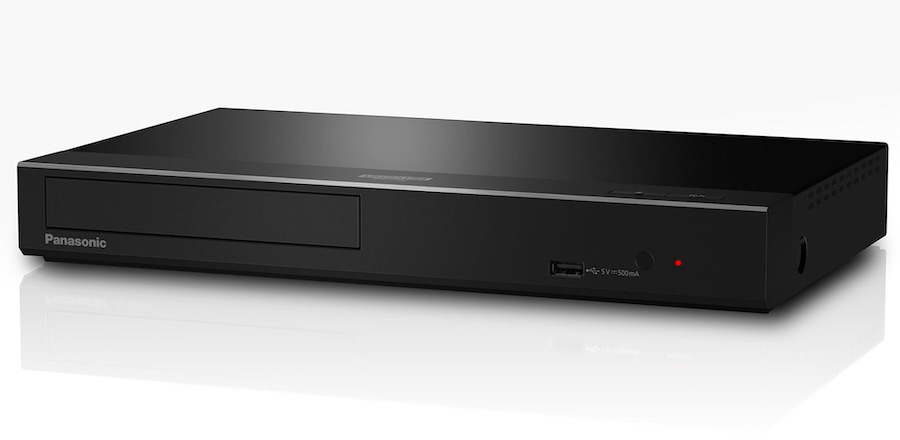
While most Blu-ray player makers exited the market some time ago, Panasonic has stuck with it, and their latest entry-level player, the DP-UB450P is a strong offering with robust performance and features at an affordable price. The player supports playback of CDs, DVDs, Blu-ray Discs (including Blu-ray 3D Discs) and UHD Blu-ray Discs. It does not support DVD-Audio or SACD Discs, though it does support the DSD audio format from digital media files on your home network or on an attached USB drive. It can even output a DSD bitstream in its native format, without converting it to PCM.
For UHD discs, the Panasonic player is compatible with HDR10, HDR10+ and Dolby Vision so that covers every HDR format that matters. It also supports the popular lossy and lossless flavors of Dolby and DTS, including Dolby Digital, Dolby Digital+, Dolby TrueHD, Dolby Atmos, DTS, DTS-HD High Resolution Audio, DTS-HD Master Audio and DTS:X (but not DTS:X Profile 2).
In terms of operation, the unit is fairly quick to load and eject discs and to navigate through disc menus. We did notice the occasional audio drop-out, but this could always be traced back to a scratch or smudge on the disc, and normally a quick clean of the disc using a cotton cloth resolved the situation.
The unit lacks Wi-Fi capability, which is inconvenient if you want to access network media files or keep the firmware up to date. But it does include an ethernet port for a wired network connection. Since there are no streaming apps on board, the lack of Wi-Fi is not critical. Fortunately an internet connection is not required to watch UHD Blu-ray Discs, regular Blu-ray Discs or DVDs and the old “BD Live” feature of the early Blu-ray Discs has gone the way of the Dodo Bird.

When tested, the UB450 was able to load and read all manner of discs, including factory pressed DVDs as well as home-recorded DVD-R and DVD+R. It had no trouble reading odd stuff like a 25-year-old dual-sided DVD of “Deliverance” which has the widescreen version of the movie on one side and the full screen (4:3) version on the other side. Upconversion of standard def DVDs to 4K was decent but when we switched the player’s output to 480P and let the TV do the upconversion (a TCL QM8K MiniLED TV), the TV did a better job, particularly in reproducing credits or any sort of text. with minimal aliasing, ghosted edges and artifacts.
UHD Blu-ray Disc playback was flawless and we confirmed that the player could output HDR10, HDR10+ and Dolby Vision to a compatible 4K display as well as both Dolby Atmos and DTS:X soundtracks to a compatible sound system.
Pros
- Fairly Affordable (under $250)
- Plays all the most popular silver discs, even Blu-ray 3D
- Supports HDR10, HDR10+ and Dolby Vision HDR
- Supports native DSD output over HDMI
- Support all flavors of Dolby and DTS surround (except DTS:X Profile 2)
- Includes a second HDMI port and coax digital jack for audio only
Cons
- No Wi-Fi support
- No DVD-Audio or SACD disc playback
- No setup button on remote
- Unexceptional build quality and styling
- Mediocre upconversion of SD content to 4K output
Where to buy: $238 at Amazon
Best Upgrade Blu-ray Player: Sony UBP-X700U 4K UHD Blu-ray Disc Player ($299)

For just a bit more than the Panasonic player, Sony’s UBP-X700U adds support for SACD disc playback as well as wireless Wi-Fi connectivity plus a handful of streaming apps like Netflix, YouTube and Amazon Prime Video. We’d recommend getting a separate video streaming device if you are a heavy streamer as these tend to work better for that purpose.
Like the Panasonic player, the Sony X700U can play CDs, DVDs, Blu-ray Discs, Blu-ray 3D Discs and UHD Blu-ray Discs. It can also play SACD discs, which the Panasonic player cannot do. Like the Panasonic player, the X700U does not support playback of the short-lived DVD-Audio disc format.
For UHD, the Sony player supports both HDR10 and Dolby Vision, but not HDR10+. It also supports decoding or bitstreaming of all the common versions of Dolby and DTS, including Dolby Digital, Dolby Digital+, Dolby TrueHD, Dolby Atmos, DTS, DTS-HD High Resolution Audio, DTS-HD Master Audio and DTS:X (but not DTS:X, Profile 2).
In terms of operation, the Sony player is relatively quick to load and eject discs and to navigate through disc menus. And like the Panasonic player, the Sony’s home menu is quite basic. In addition to an option to play “Disc” or “USB” there are links to the few streaming apps on the home page. Over the course of using the player, we did have a few isolated disc playback issues and audio/video glitches, but these almost always corresponded with visible “schmutz” on the disc or a visible scratch.
The unit includes both a wired ethernet port and built-in Wi-Fi. While you may opt not to use the on-board streaming apps, the WiFi connection is handy for firmware updates and for accessing media on your home network. Like the Panasonic player, the Sony UBP-X700U includes a second HDMI output as well as a coax digital output, each for audio only.
Upconversion of standard def DVDs to 4K was pretty good, but setting the player to 480p output for standard DVDs and allowing a Sony TV (BRAVIA 8 II OLED) to do the upconversion produced better results with less aliasing around edges and fewer upconversion artifacts.
Pros
- Relatively affordable (under $300)
- Can play CDs, DVDs, Blu-ray Discs, Blu-ray 3D Discs, UHD Blu-ray Discs and SACD discs
- Supports HDR10 and Dolby Vision HDR
- Supports native DSD output over HDMI
- Can decode or bitstream PCM and all versions of Dolby and DTS surround (except DTS:X Profile 2)
- Includes a second HDMI port and coax digital jack for audio only
Cons
- No HDR10+ supports
- No DVD-Audio playback
- Decent, but not exceptional, upconversion of SD content to 4K
- Unexceptional styling and build quality
Where to buy: $298 at Amazon
Best Media Player Under $5,000: Kaleidescape Strato V 4K Media Player ($4,495)

In 2024, Kaleidescape dropped the price of admission to their high-end media playback ecosystem from around $10,000 to $3,999 (now $4,495) with the Strato V digital media player. It offers outstanding 4K video, including HDR10 and Dolby Vision HDR, as well as lossless audio output for the highest quality PCM, DTS:X and Dolby Atmos soundtracks.
Unlike most of Kaleidescape’s previous media players, which require an external media server, the Strato V includes nearly a terabyte of on-board storage – room for up to ten movies in 4K/HDR format with lossless audio. This makes the Strato V an excellent starting point for a Kaleidescape system. It also allows customers to pack up the player and bring it to a second home or a friend’s house to enjoy that Ultra High Definition goodness outside the main home without needing to carry a server around.
Unlike the limited bandwidth of streaming, which can only deliver highly compressed video and lossy audio, Kaleidescape is a download-based system which offers extremely high quality video and lossless audio. Kaleidescape downloads exceed Blu-ray Disc in quality and are roughly on par with 4K UHD Blu-ray Discs. And Kaleidescape’s simple yet powerful user interface allows owners to interact with their movie and TV show collections quickly and intuitively.
Pros
- Outstanding 4K video performance with HDR10 and Dolby Vision
- Support for lossless audio (PCM, Dolby TrueHD, Dolby Atmos, DTS:HD Master Audio and DTS:X)
- On-board storage for up to 10 4K movies
- Integrates seamlessly with full Kaleidescape system
- Robust build quality and elegant styling
Cons
- Still fairly expensive
- No Wi-Fi (requires hard-wired ethernet connection for downloads)
Go to full review | $4,495 at Audio Advice
Best Media Player Under $3,000: Kaleidescape Strato E ($2,999)
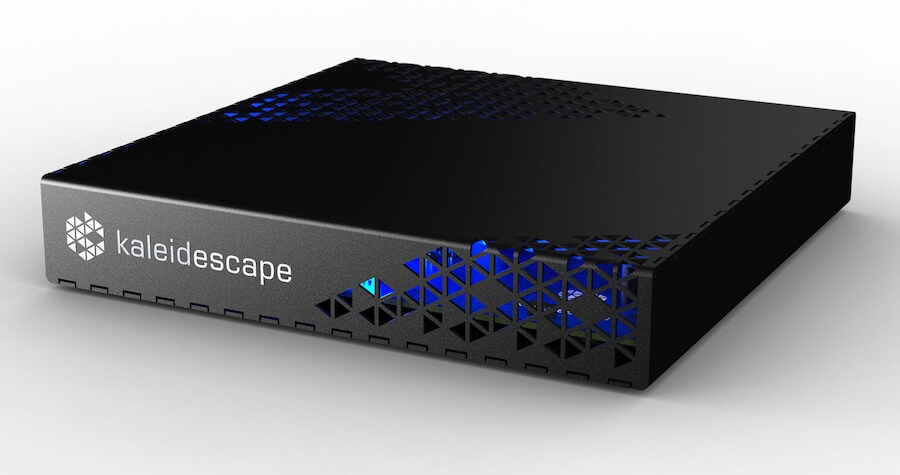
Hot on the heels of the Strato V, Kaleidescape released an even more affordable 4K media player, the Strato E. Like the Strato V, the Strato E also has on-board storage so you can use it without a media server. But the Strato E has only 500 GB of storage – enough for five high quality 4K movies (half the storage of the Strato V). Of course, you can easily remove a movie from the player without removing it from your owned collection, but managing more than 5 movies without a local Kaleidescape server on your home network can be cumbersome.
Feature and performance-wise, it’s virtually identical to its big brother, with the exception of the coax digital audio output jack being omitted on the Strato E. For most users, this isn’t important as lossless audio is carried over the unit’s HDMI port. By keeping the Strato E compact, the company is able to lower the manufacturing cost and shave the price all the way down to $2,999.
While smaller than the V, the Strato E still feels solidly build with a sturdy metal case and elegant design. Also, its compact size makes it even easier to travel with. Personally, I love the form factor as I can use it as a high quality 4K source when remotely testing TVs and projectors.
Pros
- Lower price makes Kaleidescape ecosystem accessible to more consumers
- Outstanding 4K video with HDR10 and Dolby Vision HDR
- Full lossless audio support for PCM, DTS and Dolby audio formats
- Compact size makes it easy to travel with
- Robust build quality
Cons
- No Wi-Fi (hard-wired ethernet connection required for downloads)
- Having space for only 5 movies at a time is a bit limiting
Learn more | $2,995 at Audio Advice
The Bottom Line
While video streaming services are ubiquitous and convenient, those who value the highest quality video and audio performance as well as true content “ownership” will always appreciate physical media and digital downloads. If you’re a fan of physical media or high quality digital downloads, one of our Editors Choice picks is sure to please.